CSS Inline
Javascript
Cheat Sheets
Fullscreen modes
Art Explosion ref
CSS Internal
No Script
Alistapart
slideshow script
CSS External
Null links
Special Entities
SSI
Photoshop
CSS Import
Comments
Special Characters
FTP
Inverse technique
IE 3px hack
XHTML requirements
HTML cheat sheet PDF
domain transfers
PShop patterns
-
mine
Absolute Positioning
media=print
resizer
Seamless tiles
Lists
<hr>
superscript
www.w3.org
1
preformatted email
Vanishing pt.
video
Grow Facebook audience
favicon generator
www.w3.org
2
color palette
IE only
resample
vignette
film grain
SMS: email text messages
SEO
Onsite optimization
Animated GIFs in CS4
Security
Circle bullets in Mozilla
Top Margin
- old school
Microsoft
-
view full menu
Kill SPAM javascript
CorelDRAW
Form input widths
JS Alert
Kill SPAM unicode
Corel workspace
CSS text nowrap
Rich Media pop-ups
Word
Password creator
text wrap
Word - remove revisions
Password creator hardcore
Social
TextPad reg expression
Word - remove border
Recycle Bin
Facebook post to Twitter
Excel
Start Menu
Excel formulas
RDP
Text wrap
Outlook
-
email as read
My Guys Moving dev
Javascript - proper tag
<script type="text/javascript"></script>
IE 3 pixel hack
/* 3 pixels IE Hack */ /* Hide from IE5-mac. Only IE-win sees this. \*/ * html #userinfo.boxbody {width: 202px;} /* End hide from IE5/mac */
Absolute Positioning
img.pmi { position: absolute; top: 0; left: 361px; border: 0; }
media="print"
<link rel="stylesheet" type="text/css" media="print" href="print.css" />
Special Characters - "View Source" to copy this code
Bullet • <!-- • --> Dashes en dash – <!-- – --> em dash — <!-- — --> Ampersand & Copyright © TM ™ Quote double " Quote single ' Non-breaking space or Arrows → → ↓ ↓ ← ↑ Hexadecimal &#x<hex-number> Decimal &#<dec-number>; without the "x"
Input fields
HTML <td width="300" align="left"> <input class="text" type="password" name="strPassword" size="24" maxlength="20"> </td> CSS input.text {width: 165px;}
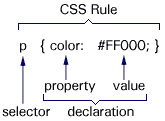
CSS - Inline
<p style="font-size: 12pt; font-family: Verdana, Arial, Helvetica, sans-serif; color: #000000">style sheets</p> <ol style="list-style-type: lower-alpha;">
CSS - Internal
<style type="text/css"> <!-- body { font: small/1.3 Verdana, Arial, sans-serif; color: #333; background: #FFF; margin: 0; padding: 0; } h2 {font: 1.8em Georgia, Times, serif;} #sample {background: transparent url("l.jpg") 25px 35px no-repeat;} --> </style>
CSS - External
<link rel="stylesheet" type="text/css" href="zstyle.css" /> - or - <link rel="stylesheet" type="text/css" media="print" href="/c/print.css" />
CSS - Import
<style type='text/css'>@import url(css/main.css);</style> Where main.css is: @import url(fonts.css); @import url(images.css); @import url(pagesize.css); @import url(colors.css); @import url(cursors.css); @import url(widths.css); @import url(align.css); @import url(borders.css); @import url(margins.css); /* Include customizations last so they have priority */ @import url(splash.css); @import url(custom.css);
Lists
Ordered 1. <ol> 1. <ol style="list-style-type: decimal;"> a. <ol style="list-style-type: lower-alpha;"> A. <ol style="list-style-type: upper-alpha;"> i. <ol style="list-style-type: lower-roman;"> I. <ol style="list-style-type: upper-roman;"> <ol style="list-style-type: none;"> Unordered list-style-type: circle; list-style-type: disc; list-style-type: square; list-style-type: none; Old School ------------- Ordered <li type="1"> <li type="a"> <li type="A"> <li type="i"> <li type="I"> Unordered <li type="circle"> <li type="square"> <li type="disc"> For Consistent Mozilla/IE alignment ul { margin-left: 6px; padding-left: 6px;} li { margin-left: 2px; color: #663300;}
Comments
HTML <!-- --> CSS /* */ JavaScript // single line /* multiple lines same as CSS */ To comment out an apostrophe, use \' or \u0027
Top Margin
<body bgcolor="#FFFFFF" text="#000000" topmargin="0" leftmargin="0" marginwidth="0" marginheight="0">
SSI
<!--#include virtual="/menu.html" -->
Creating a Null Link
<a href="javascript:;">Null Link</a> <a href="javascript: void(0)">Null Link</a> <a href="#">Null Link</a>
No Script
<noscript><strong><font color="#FF0000" size="3" face="Verdana, Arial, Helvetica, sans-serif"> Your browser doesn't support script; enable Javascript to see menu & navigate site.</font> </strong></noscript>
Fullscreen modes
==================================================== "FULLSCREEN" SCRIPT in <head> - Not true Kiosk Mode ==================================================== <script language="JavaScript" type="text/JavaScript"> <!-- if (document.all || document.layers) { self.moveTo(0,0); self.resizeTo(screen.availWidth,screen.availHeight) } //--> </script> ==================================================== REFRESH Techniques ==================================================== <body onLoad="javascript:window.open('launch.htm', 'VCampus', 'fullscreen=yes')"> TRUE Kiosk Mode in IE In IE, it opens a browser session in true kiosk more In NS, it spawns a new browser session the same size as its parent w/ NO browser dressing ----------------------------------------------------------------------------------------- <meta http-equiv="Refresh" content="3;URL=launch.htm;fullscreen=yes"> NOT true Kiosk Mode In IE, it opens the biggest possible browser session w/ top browser dressing In NS, it opens in same browser session w/ no fullscreen at all
XHTML
1. All tags in lowercase 2. Quote all attributes 3. All attributes require values (Ex. checked needs to be checked="checked") 4. Close all tags 5. Close empty tags <br /> <img src="" /> 6. No double quotes in comments
Superscript
HTML <span class='reg'>®</span> CSS .reg {font-size: 80%; vertical-align: 2px; }
Styling <hr>
hr { color: #F63; background-color: #F63; border: none; }
Form input field widths
form .seltext { width: 95px; font-size: 80%; margin-bottom: 9px; }
Preformatted Email
<a title="email" href="mailto:John@CompanyB.com?subject=Test Topic&body= Please provide the following to help us identify your profile: First Name, Last Name, Job Title, Email Address, Station Number, Phone Number, Last known Course Registration. You will receive notification of the status of your profile search within 7 business days.">Profile Help</a>
How to remove programs from Startup
RUN > MSCONFIG > Startup tab
Remote Desktop
Start > Programs > Accessories > Communications > Remote Desktop - edit
JS Alert
<script type="text/javascript"> window.alert("To Print Certificate\r\nSet Page to Landscape\r\nFile > Page Setup > Orientation: Landscape") </script>
CSS text nowrap
<span style="white-space:nowrap;">e-Learning</span>
Domain transfers
---------------------------------- How to transfer domains to GoDaddy ---------------------------------- 1. NetSol > Manage Domains > Unlock Domain Protect & Request Authorization Code (May need to turn off Private Registration, too) 2. GoDaddy > Initiate & Pay for transfer 3. GoDaddy > Domain Manager > Pending Transfers - select domain, then upper rt corner, click "Authorization" 4. 2 emails will be sent to Admin contact. Retrieve from GoDaddy email, the Transaction ID & Security Code. Retrieve from NetSol email, the Authorization Code. 5. Enter the info, wait 5-6 business days for former registrar to release. ---------------------------------------------- Handling multiple domains on 1 hosting account ---------------------------------------------- Use Domain Forwarding with 301 Redirect to avoid SEO penalty Domain Mgr.> Forwarding Check Enabled Check 301 Redirect
Send text messages to a cell phone
Send text messages to a cell phone by emailing to: AT&T phonenumber@txt.att.net Nextel phonenumber@messaging.nextel.com Sprint phonenumber@messaging.sprintpcs.com T-Mobile phonenumber@tmomail.net Verizon phonenumber@vtext.com Virgin phonenumber@vmobl.com phonenumber = the 10 digit phone number
SEO tips
To check if Google has crawled and indexed a site. Go to Google.com, in search box, type site:www.yourwebsite.com Remember your robots.txt User-agent: * Disallow:
Photoshop inverse technique
1. Copy background layer 2. Ctrl-I to inverse it 3. Switch blend mode to Color
Photoshop - Resizing techniques
Image Size > Resample Image For Enlargements - Use Bicubic Smoother For Reductions - Use Bicubic Sharper For images with hard edges - Use Nearest Neighbor
Photoshop - Make your own patterns
1. Make a new file with 4x4 pixels, or 8x8 or 300x300 whatever you want. 2. Create a pattern. 3. Define the pattern. Go to Edit>Define Pattern...Name your pattern anything DONE! C:\Program Files\Adobe\Photoshop 7.0\Presets\Patterns Apply pattern. 1. Go to Edit>Fill.. From the Use Box, select Pattern From the Custom Pattern, select the pattern you just created. -OR- 2. Add a layer over a graphic that you want to effect Fill with black, click f/x, pattern overlay, choose your pattern then adjust opacity to ~20%
Photoshop - Seamless tiles for web backgrounds
1. Open single-layer file that you want to tile. 2. Filter > Other > Offset 3. Check (x) Wraparound 4. Offset anywhere from 25-33%; this will show the seams 5. Use clone tool to blend out the seams
Photoshop - add vignette, non-destructively
1. DO THIS AS YOUR LAST STEP IN PHOTOSHOP! 2. Create a new empty layer on top of the stack. Ctrl + Alt + Shift + N 3. Fill the layer with pure white. Shift + Backspace 4. Set the blend mode to "Multiply". Alt + Shift + M 5. Apply the vignette filter to the new layer. Filter > Distort > Lens Correction 6. Mess with the "Amount" and "Midpoint" sliders in the "Vignette" section. 7. Press "OK" Original article at http://blog.epicedits.com/2007/09/18/quick-tip-using-photoshop-to-add-vignette/
How to remove a border from a page in Word
1. On the Format menu, click Borders and Shading, and then click the Page Border tab. 2. Under Setting, click None.
How to open animated GIFs in Photoshop CS4
1. Go to File > Import > Video Frames to Layers 2. In the File Name box type “*” (or type the name manually) The window will now show every type of file. 3. Select your gif and you're done!
How to create a formula in Excel
Type = in cell that you want the result to display, click the cell that's going be multiplied, then for example, type *125
Vanishing Point
Copy image into memory Filter > Vanishing Point... [If you forget to copy image, just save your grid by clicking OK after drawing it.] Create New Layer [otherwise image will be pasted into background layer] Ctrl-V to paste image into grid Ctrl-T to transform [Ctrl-0 if so huge that you can't get edges] To mimic background lighting, make selection then copy background: Ctrl-J Move new layer OVER grid layer Remove color info: Sht-Ctrl-U Change Blend mode to "Hard Light"
Fully expanded menus in Word & Outlook
To get menus in MS Word & Outlook to fully expand, Tools > Customize > Options check 'Always show full menu'
Wrap Text around graphic in CorelDRAW 11
In "Paragraph Text" mode, click Paragraph Text block, then right-click image (or shape) and select "Wrap Paragraph Text." Here's a different technique http://www.youtube.com/watch?v=0ZI-4t3BQxM
Excel - text wrap
Select Cell Format Cells... TAB - Alignment Text Control [ ] Wrap Text
TextPad replace expression
To Find/Replace a paragraph return with a comma and space, use \n ,
Recycle Bin - When You Cannot Delete File
First try SHT-Delete, then
Use DOS command rd c:\recycler /s
Restart PC
Empty Recycle Bin
Using IE to FTP - invalid as of IE8
In browser address, type ftp://username:password@domain.com
or ftp://username@domain.com
How to Grow Facebook audience
Suggest Page / Grow Facebook audience by uploading customer emails: Notifications > Suggest Page > Contact List File... How to create a contact file > Other .csv
TOP
|
HOME
Knowledge base by
Brendan Bowie
:: Zen Creations Design Studio